
OpenClaw APK
Your self-hosted AI assistant on Android
OpenClaw is the official Android app for the open-source OpenClaw AI assistant. Pair with your own Gateway to chat, use voice Talk mode, approve actions and enable phone features. Free, 21 MB, Android 12+.
OpenClaw APKDownload for Android · 21 MB



More about OpenClaw
| Name | OpenClaw |
|---|---|
| Package name | ai.openclaw.app |
| Category | Communication |
| Version | 2026.10.70 |
| Size | 21 MB |
| Requires Android | Android 12+ |
| Developer | OpenClaw Foundation |
| Installs | 100K+ |
| Last updated | 28 Oct 2026 |
| Get it on | Google Play |
OpenClaw APK is the official Android app for OpenClaw, the open-source personal AI assistant that you run on your own devices. The app turns your phone into a secure “node” for your private OpenClaw Gateway, so you can chat with your assistant, talk to it by voice, approve its actions and let it use phone features you allow. Published by the OpenClaw Foundation, it has passed 100,000 downloads on Google Play and was picked by Android Authority as one of the best new Android apps of July 2026.
This guide explains what OpenClaw is, how the Android app works, setup steps, features, requirements and how to download OpenClaw safely.
What is OpenClaw?
OpenClaw (previously known as Clawdbot and Moltbot) is a local-first AI agent platform. Instead of using a company’s cloud assistant, you run your own OpenClaw Gateway and decide which AI models, keys, settings and permissions it uses. The Android app is the mobile companion: it connects to your Gateway and lets you use the assistant from anywhere.
Important: the Android app does not work on its own. You need a running OpenClaw Gateway (for example on your PC or a server) to pair with.

OpenClaw APK Details
| App name | OpenClaw |
| Developer | OpenClaw Foundation |
| Package name | ai.openclaw.app |
| Released on Google Play | April 7, 2026 |
| Latest version | 2026.10.70 (updated October 28, 2026) |
| Download size | About 21 MB |
| Requires | Android 12 and up |
| Category | Communication / AI assistant |
| Price | Free |
| Downloads | 100K+ · Everyone |
Key Features of OpenClaw for Android
1. Easy Pairing
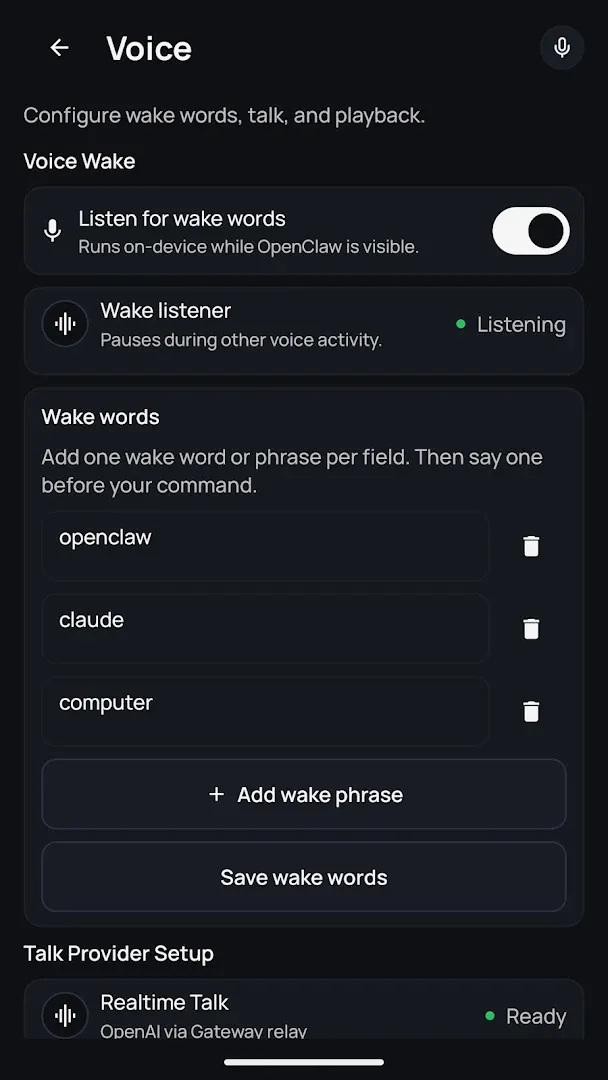
Pair the app with your private OpenClaw Gateway by scanning a QR code or entering a setup code.
2. Chat With Your Assistant
Send messages to your AI assistant from your phone, with folders and group chats organized in the sidebar.
3. Talk Mode and Push-to-Talk
Speak to your assistant in realtime Talk mode or use push-to-talk for quick voice commands.
4. Action Approvals
Review and approve the actions your Gateway wants to take – right from your phone.
5. Device Capabilities (Opt-In)
Choose whether your assistant can use your camera, screen, location and notifications. Everything is controlled by Android permissions.
6. Wear OS Companion
Open voice or chat from your watch using the OpenClaw Tile (requires a paired phone running OpenClaw).
How to Download and Set Up OpenClaw APK
- Set up your OpenClaw Gateway on your computer or server first.
- Tap Get it on Google Play on this page and install the app (about 21 MB).
- Open OpenClaw and pair it with your Gateway using the QR code or setup code.
- Grant only the permissions you want, then start chatting or use Talk mode.
Is OpenClaw APK Safe?
The official app from the OpenClaw Foundation on Google Play is the safe choice. It is local-first – you control your gateway, keys and permissions – and the developer reports no data shared with third parties. Be careful: Google Play has many unofficial “OpenClaw” and “Clawdbot” clones. Make sure the developer is OpenClaw Foundation and the package name is ai.openclaw.app.
Requirements
- Android version: 12 or newer
- Download size: about 21 MB
- A running OpenClaw Gateway to pair with
- Internet connection between your phone and the Gateway
- Optional: Wear OS watch

Tips for Using OpenClaw on Android
- Keep app and Gateway updated: version mismatches between the two cause most problems users report.
- Start with few permissions: enable camera, screen or location only when a workflow needs them.
- Use approvals: review sensitive actions before your agent runs them.
- Try Talk mode: voice is the fastest way to use your assistant on the go.
Pros and Cons of OpenClaw
Pros
- Private, self-hosted AI assistant on your phone
- Chat, voice and action approvals in one app
- Free and lightweight (21 MB)
- Wear OS support
Cons
- Needs your own OpenClaw Gateway – not for beginners
- Low 2.4★ rating due to setup and version-mismatch issues
- Many fake clone apps on the Play Store
Similar Apps on APKsLab
- Sunbird APK – iMessage on Android.
- Notability APK – AI and PDF note-taking.
- GameNative APK – play PC games natively on Android.
Browse more Communication apps on APKsLab.
Final Verdict
OpenClaw for Android is a powerful companion if you already run your own OpenClaw Gateway. It brings chat, voice and approvals to your pocket while keeping you in control of your data. For casual users who just want a ready-made chatbot, it is not the right app – but for AI tinkerers it is essential.
Frequently asked questions
What is the OpenClaw app?
Does OpenClaw work without a Gateway?
Is OpenClaw free?
How do I know I have the real OpenClaw app?
What are the OpenClaw requirements?
Apps like OpenClaw
See all Sunbird
Recommended Apps
See all Notability
 Radio Addict
 Retro – Photos with Friends
 Stremio
 GameNative
 SongFlip
 Adobe Premiere
 Material Files
 I’m Miri: AI Astrology & Tarot
 Divine
 Loops
Loops
 Rowtine
Recommended Games
See all Red Ball Forever
 Soccer Manager 2027
 MotoGP Rivals
 Kettle Street: Cosy Life Sim
 Winter Burrow
 Saints Row: The Third
 Vampire Crawlers
 Sifu
Sifu
 Bloons Blitz
 ONE PIECE: Grand Gourmet
 Truckful
 Monster Hunter Outlanders
Ratings and reviews
No reviews yet. Be the first to rate OpenClaw.